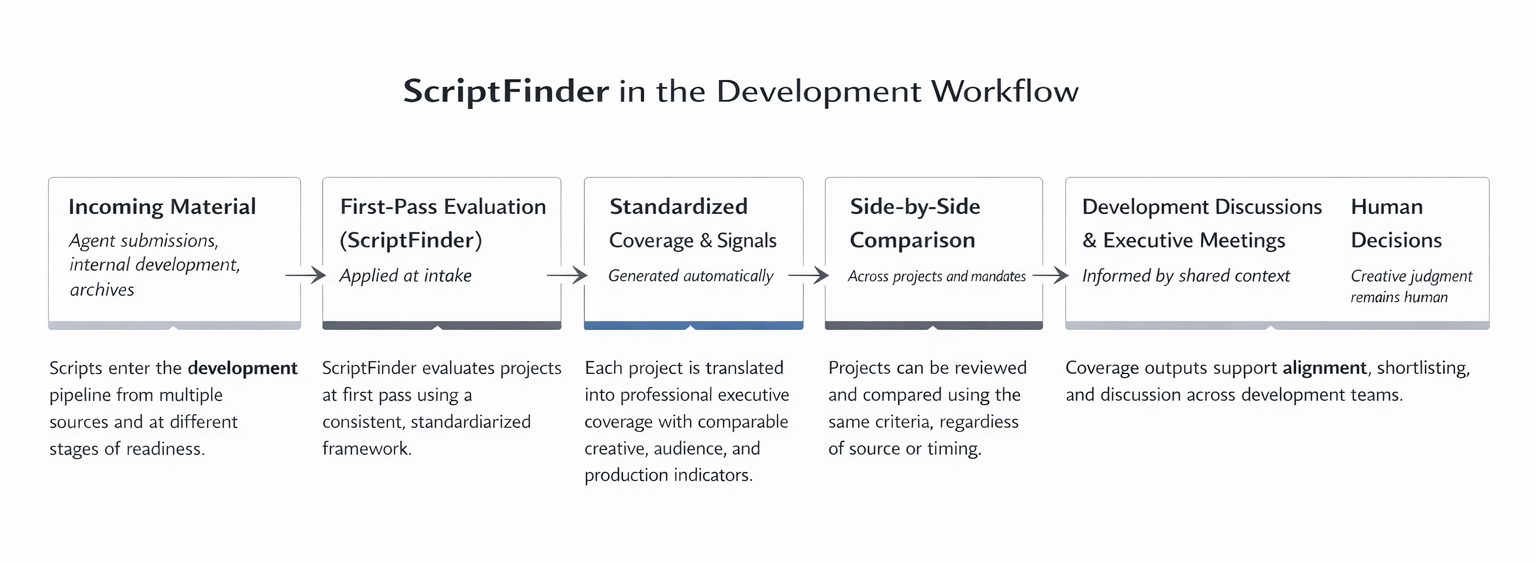
ScriptFinder is applied at the earliest stage of development — first pass.
It sits between incoming material and human discussion, standardizing evaluation before projects reach readers, executives, or meetings.
Where ScriptFinder Fits
ScriptFinder operates before internal coverage meetings, shortlists, and mandate alignment discussions.
It does not replace readers or executives.
It supports them by standardizing signal at scale.
The Workflow
1. Upload Scripts
Development teams log into a private web interface and upload unread scripts or existing material from internal libraries.
Projects are added to the organization’s internal database and prepared for first-pass evaluation.
2. Evaluation & Coverage
ScriptFinder reads each project in full and generates a standardized executive coverage report.
Outputs include structured project snapshots, neutral summaries, writing and structure assessments, audience indicators, and production reality checks — all generated using the same framework.
3. Review and Compare
Coverage reports can be reviewed individually or compared side by side across multiple projects.
This enables clearer prioritization, faster shortlisting, and more focused development discussions.
Before and After
Before ScriptFinder
inconsistent first-pass coverage
difficulty comparing projects
lost context as priorities change
With ScriptFinder
standardized evaluation at intake
comparable signals across projects
easier re-review under new objectives
Human Judgment Remains Central
ScriptFinder does not make decisions.
It does not greenlight projects or replace creative judgment.
Final evaluation, discussion, and decision-making remain fully human — informed by clearer, more consistent information.
Request a Demo
See how ScriptFinder fits into your development workflow.